YouTube Videos Logo

Related Topics:

Posted on Oct 11, 2009

WHEN I TRY TO OPEN A VIDEO IT SAYS THAT JAVASCRIPT IS OFF (which is not) OR I NEED TO DOWNLOAD THE LATEST VERSION OF ADOBE FLASH WHICHi did and I can't open any.

1 Answer

Anonymous

Level 1:

An expert who has achieved level 1.

  • Contributor 2 Answers
  • Posted on Oct 11, 2009
Anonymous
Contributor
Level 1:

An expert who has achieved level 1.

Joined: Oct 11, 2009
Answers
2
Questions
0
Helped
4005
Points
6

"Hello, you either have JavaScript turned off or an old version of Macromedia's Flash Player. Get the latest Flash player." To enable the java script clear the cookies in IE and Mozilla Firefox

Add Your Answer

×

Uploading: 0%

my-video-file.mp4

Complete. Click "Add" to insert your video. Add

×

Loading...
Loading...

Related Questions:

0helpful
1answer

Youtube will load but not play

Hi Paul.
Fix videos and games that won't play If a YouTube video, Facebook game or other media isn't working, try the steps below to fix it.
These steps can help for:
  • A video or game that won't load
  • A video or game that's blank
  • A grey box that shows instead of a video or game
  • Chrome freezes or crashes while loading a video or game
COMPUTER ANDROIDIPHONE & IPAD Step 1: Allow Flash on the site Look for an error that says 'Click to enable Adobe Flash Player' or a message about downloading Flash. If you see these errors, the site needs permission to use Flash.
Only allow Flash to run on websites that you trust.
  1. On your computer, open Chrome.
  2. Go to the site with the video or game.
  3. To the left of the web address, click Lock or Info .
  4. To the right of 'Flash', click the Arrows .
  5. Choose Always allow on this site.
  6. At the top-left, click Reload .
Step 2: Turn on JavaScript Some media needs JavaScript. YouTube videos, for example, won't run without JavaScript.
  1. On your computer, open Chrome.
  2. At the top-right, click More Settings.
  3. At the bottom, click Advanced.
  4. Under 'Privacy and security', click Content settings.
  5. Click Javascript.
  6. Turn on Allowed (recommended).
  7. Go back to the site with the video or game. At the top-left, click Reload .
Step 3: Check your extensions, plug-ins, cache and cookies Some video or game issues are caused by Chrome extensions, plug-ins, or something saved in your cache or browser data.
  1. On your computer, open Chrome.
  2. At the top-right, click More New Incognito Window.
  3. In the Incognito window, go to the site with the video or game.

resetting your Chrome settings.
Step 6: Reset your Internet connection Your Internet network could be causing problems with the video or game.
  1. Turn off your computer.
  2. Unplug your modem. If your wireless router is a separate device, unplug it too.
  3. Wait for about one minute.
  4. Plug in your modem and wait until all the lights have stopped blinking. If your wireless router is a separate device, plug it back in and wait until all the lights have stopped blinking.
  5. Turn on your computer.
  6. Go back to the site with the video or game. At the top-left, click Reload .
0helpful
1answer

I want to revert back to yahoo mail classic, but don't know how.

If you are not yet ready to use the new yahoo then please try the steps below.

You just need to turn off the Javascript of your browser. Login to your yahoo mail then Follow these steps

1- If your browser is firefox do the following
2- Open TOOLS -> OPTIONS -> CONTENT, click on "DISABLE JAVASCRIPT".
3 - press F5 or reload your browser screen
4 - Follow one step instruction on your screen
5 - After that Enable the Javascript again. By going to Step 2

=================

1- If your browser is Internet Explorer do the following
2- Open TOOLS > INTERNET OPTIONS >> SECURITY. In security click "CUSTOM LEVEL" -> disable active scripting in the scripting section.
3- press F5 or reload your browser screen
4- Follow one step instruction on your screen
5 - After that Enable the Javascript again. By going to Step 2

===================

1 - If your browser is Safari
2 - Open SETTINGS>click PREFERENCES>>click SECURITY>>Uncheck ENABLE JAVA and ENABLE JAVASCRIPT
3 - press F5 or Reloard your browser screen
4- Follow one step instruction on your screen
5 - After that Enable the Javascript again. By going to Step 2
Sep 07, 2011 • Yahoo Mail
0helpful
1answer

I was gone 4 12 days i am getting a different type of e mail i did not change anything i want to be able to have my old classic e mail back

Please try this as its working for me when I switch back to the classic look of yahoo mail. You just need to turn off the Javascript of your browser. Login to your yahoo mail then Follow these steps

1- If your browser is firefox do the following
2- Open TOOLS -> OPTIONS -> CONTENT, click on "DISABLE JAVASCRIPT".
3 - press F5 or reload your browser screen
4 - Follow one step instruction on your screen
5 - After that Enable the Javascript again. By going to Step 2

=================

1- If your browser is Internet Explorer do the following
2- Open TOOLS > INTERNET OPTIONS >> SECURITY. In security click "CUSTOM LEVEL" -> disable active scripting in the scripting section.
3- press F5 or reload your browser screen
4- Follow one step instruction on your screen
5 - After that Enable the Javascript again. By going to Step 2

===================

1 - If your browser is Safari
2 - Open SETTINGS>click PREFERENCES>>click SECURITY>>Uncheck ENABLE JAVA and ENABLE JAVASCRIPT
3 - press F5 or Reloard your browser screen
4- Follow one step instruction on your screen
5 - After that Enable the Javascript again. By going to Step 2
Sep 06, 2011 • Yahoo Mail
0helpful
1answer

I cant open my inbox or contacts or anything. i also want cassic yahh. HELP

You just need to turn off the Javascript of your browser. Login to your yahoo mail then Follow these steps

1- If your browser is firefox do the following
2- Open TOOLS -> OPTIONS -> CONTENT, click on "DISABLE JAVASCRIPT".
3 - press F5 or reload your browser screen
4 - Follow one step instruction on your screen
5 - After that Enable the Javascript again. By going to Step 2

=================

1- If your browser is Internet Explorer do the following
2- Open TOOLS > INTERNET OPTIONS >> SECURITY. In security click "CUSTOM LEVEL" -> disable active scripting in the scripting section.
3- press F5 or reload your browser screen
4- Follow one step instruction on your screen
5 - After that Enable the Javascript again. By going to Step 2

===================

1 - If your browser is Safari
2 - Open SETTINGS>click PREFERENCES>>click SECURITY>>Uncheck ENABLE JAVA and ENABLE JAVASCRIPT
3 - press F5 or Reloard your browser screen
4- Follow one step instruction on your screen
5 - After that Enable the Javascript again. By going to Step 2
Sep 04, 2011 • Yahoo Mail
0helpful
1answer

I want to revert to Yahoo Classic Mail please

You have not mentioned your web browser. ANyway try this as it works for me.

You just need to turn off the Javascript of your browser. Login to your yahoo mail then Follow these steps

1- If your browser is firefox do the following
2- Open TOOLS -> OPTIONS -> CONTENT, click on "DISABLE JAVASCRIPT".
3 - press F5 or reload your browser screen
4 - Follow one step instruction on your screen
5 - After that Enable the Javascript again. By going to Step 2

=================

1- If your browser is Internet Explorer do the following
2- Open TOOLS > INTERNET OPTIONS >> SECURITY. In security click "CUSTOM LEVEL" -> disable active scripting in the scripting section.
3- press F5 or reload your browser screen
4- Follow one step instruction on your screen
5 - After that Enable the Javascript again. By going to Step 2

===================

1 - If your browser is Safari
2 - Open SETTINGS>click PREFERENCES>>click SECURITY>>Uncheck ENABLE JAVA and ENABLE JAVASCRIPT
3 - press F5 or Reloard your browser screen
4- Follow one step instruction on your screen
5 - After that Enable the Javascript again. By going to Step 2
Sep 04, 2011 • Yahoo Mail
0helpful
1answer

I need instructions on how to dowload videos from youtube using google chrome browser and vbox7 downloader

firstly u should open ur account on u tube,
then you can try following Bookmarklet (Javascript plugins), it will instantly get the video URL from the webpage even if it's not yet finished loading. No Website or software is needed. It's a bookmarklet(a bookmark containing JavaScript) in practice, you can also use it in FireFox, Safari or Inetnet Explorer.

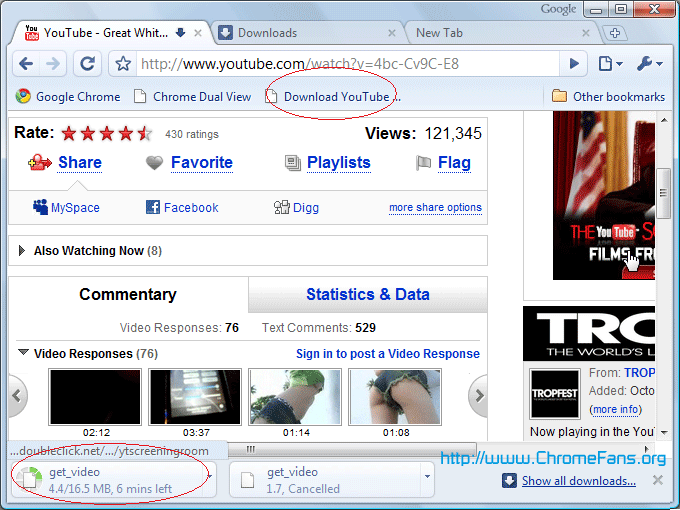
span-download-youtube-video.png Install Google Chrome Plug-in: Download YouTube Video/Movie in Google Chrome Install this Javascript Plug-in is very easy, please do following steps:

  1. Make sure your Google Chrome browser always shows the Bookmarks bar. You can click menu Tools -> Always show bookmarks bar, the hotkey is Ctrl + B.
  2. Right click on the bookmarks bar, and then select Add Page.
  3. download-youtube-video-1.png

  4. In the Name field, enter "Download YouTube Video" or something you will remember, then for the URL field paste:
  5. javascript:window.location.href = 'http://youtube.com/get_video?video_id=' + swfArgs['video_id']+ "&l=" + swfArgs['l'] + "&sk=" + swfArgs['sk'] + '&fmt_map' + swfArgs['fmt_map'] + '&t=' + swfArgs['t'];Update: Nov 23, 2009: YouTube has modified the video parameters, the code above can't work now, use this:
    javascript:window.location.href = 'http://youtube.com/get_video?video_id=' + yt.getConfig("SWF_ARGS")['video_id'] + "&sk=" + yt.getConfig("SWF_ARGS")['sk'] + '&t=' + yt.getConfig("SWF_ARGS")['t'];

    download-youtube-video-2.png

  6. Click OK button.
How to use Plug-in to download YouTube Video in Google Chrome Now, the Javascript plugin is installed in your Google Chrome. Go to the YouTube video you want to download, when it starts playing click your "Download YouTube Video" bookmark and you will see the .flv file start to download in Google Chrome's download status bar.

download-youtube-video-3.png

Feb 26, 2011 • Home
0helpful
1answer

I can't see video in you tube, i try to install flash player, but it's can't.. help me please,, thanks..

If you're receiving this error message and unable to play videos,
here's what I recommend to get you back on track and able to watch
videos successfully again. Please follow the steps listed below...

1. Uninstall the version of Adobe Flash that you currently have
running on your computer. You can uninstall Flash here:
http://kb.adobe.com/selfservice/viewContent.do?externalId=tn_14157

2. Once you've uninstalled Flash, then go to the Adobe site and
download the most recent version of the Flash player:
http://get.adobe.com/flashplayer/

3. At this point, completely exit your browser (don't just close the
window, exit the browser completely).

4. Only now, once you've exited your browser, can you install the new
version of the Flash player you just downloaded. Install the Flash
player.

5. Finally, open your browser again. Go to YouTube and try playing a
video-- the video should now play!

6. If the video *still* doesn't play, make sure you have JavaScript
enabled (turned on) in your browser.

If you're not sure how to do this, do a Google search for your browser
and then "enable JavaScript". You should easily find instructions on
how to enable Javascript.

Here are a couple of examples for Firefox, Internet Explorer, and
Opera users:

http://www.ehow.com/how_2033406_enable-javascript-firefox.html
and
http://www.tranexp.com/win/JavaScript-enabling.htm

We really hope these tips help! Good luck & enjoy
Apr 30, 2010 • Yahoo Mail
0helpful
1answer

Javascript or Flash update

download latest flash player...
0helpful
1answer

I KEEP TRYING TO VIEW VIDEOS ON YOUTUBE AND MYSPACE AND IT KEEPS SAYING I NEED FLASHPLAYER BUT IT WON'T LET ME DOWNLOAD IT ALSO IT SAYS ENABLE JAVASCRIPT. WHAT DO I DO TO SOLVE THESE PROBLEMS?

you can't watch video if your pc dont have flash and java script on it
try to go in this link for Flashplayer download: http://www.adobe.com/products/flashplayer/
javascript: http://www.brothersoft.com/javascript-download-9640.html
0helpful
1answer

I want to download javascript

i faceing a problem on youtube they were askin javascript when ever im trying to open youtube search
Not finding what you are looking for?

151 views

Ask a Question

Usually answered in minutes!

Top YouTube Computers & Internet Experts

Grand Canyon Tech
Grand Canyon Tech

Level 3 Expert

3869 Answers

Sudeep Chatterjee
Sudeep Chatterjee

Level 3 Expert

3269 Answers

ADMIN Andrew
ADMIN Andrew

Level 3 Expert

73794 Answers

Are you a YouTube Computer and Internet Expert? Answer questions, earn points and help others

Answer questions

Manuals & User Guides

Loading...