Forgot restriction passcode

How to reset restrictions passcode on iPhone if you remember
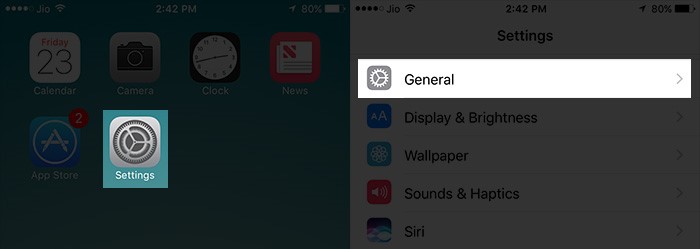
Step 1: Tap on Settings, then go to General.
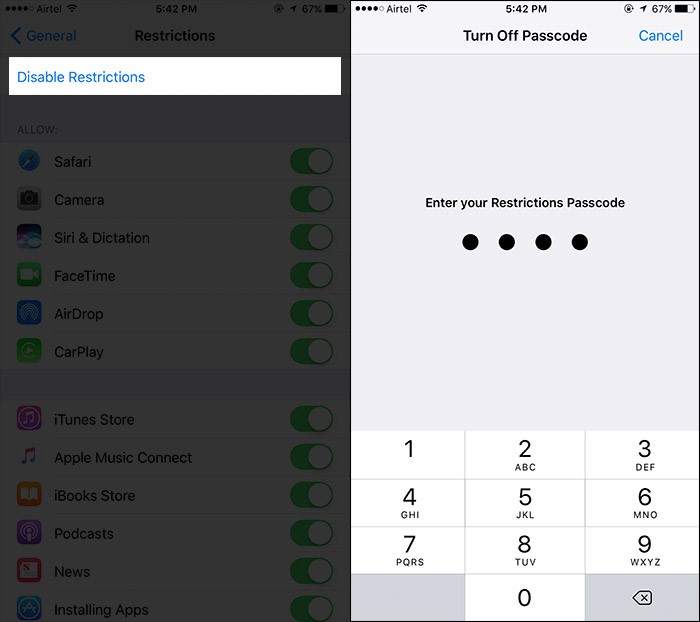
Step 2: Tap on Restriction, and enter your existing passcode.
Step 3: Tap on Disable Restrictions, and enter your existing passcode again.
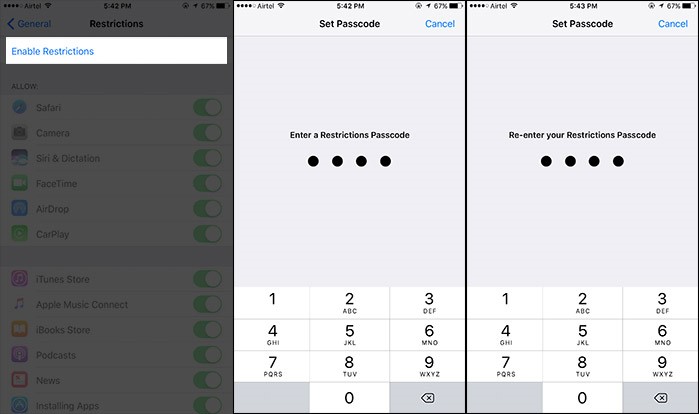
Step 4: Tap on Enable Restrictions, and enter (twice) new passcode.
If you forgot the restrictions passcode, you can refer to this guide. How to Reset Restrictions Passcode on iPhone?

JUST RESTORE YOUR PHONE IN DFU MODE WITH LATEST UPDATE
ALL DATA WILL BE LOST SO BE SURE TO BACKUP ALL
FOR DFU MODE
CONNECT YOUR PHONE TO PC
HOLD POWER + HOME BUTTON WHEN SCREEN GOES OFF
COUNT UPTO 6 AND RELEASE POWER BUTTON WHILE HOLDING HOME BUTTON
568 views
Usually answered in minutes!



×